Pull Request Workflow
Best practices for working with feature flags in pull requests to maximize FlagShark's effectiveness.
A well-structured pull request workflow is essential for effective feature flag management. This guide covers best practices for creating, reviewing, and merging PRs that contain feature flags.
The Ideal PR Workflow
Opening a PR with New Flags
When you open a pull request that introduces new feature flags, FlagShark automatically:
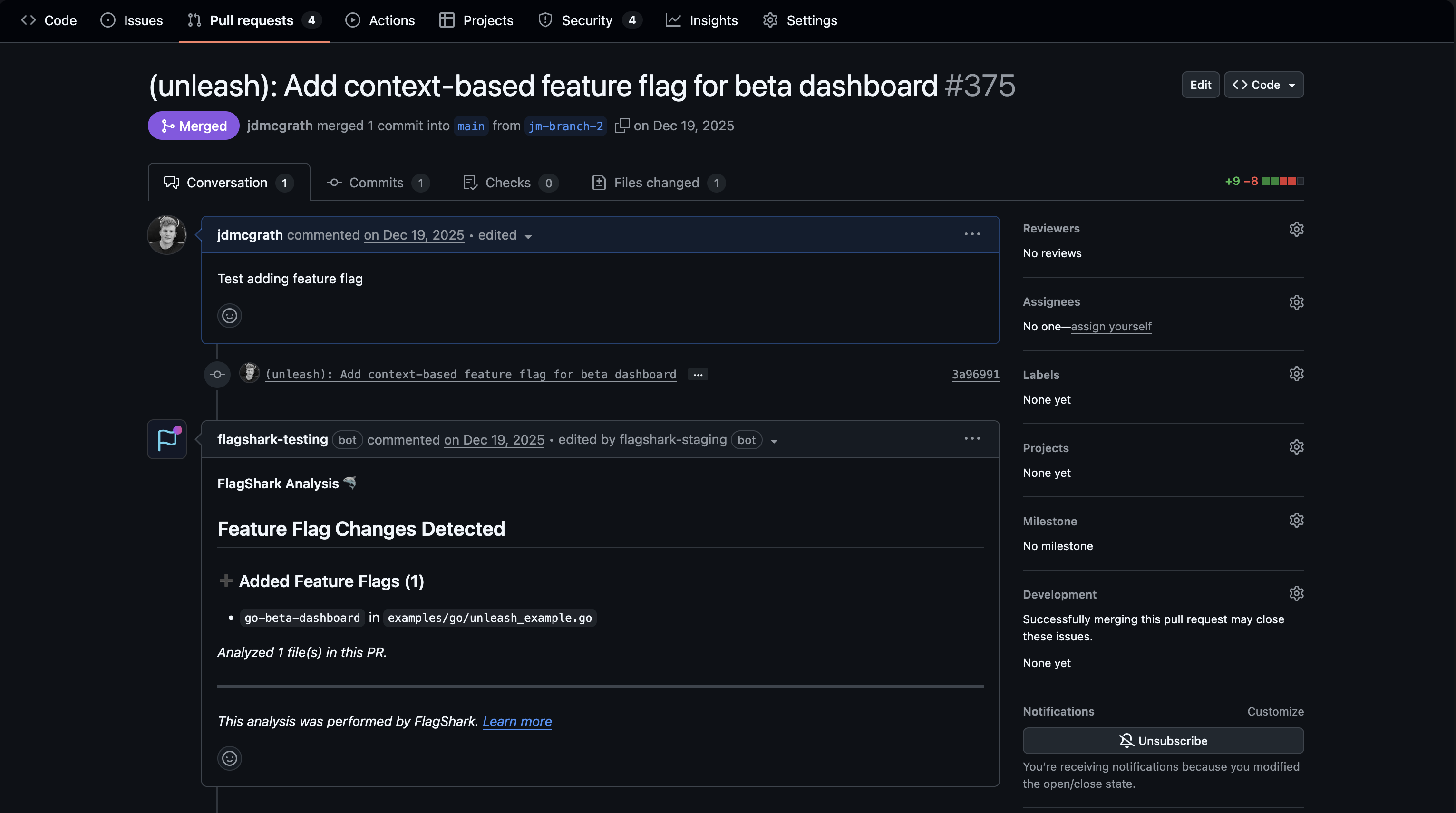
What FlagShark Detects
For each flag in your PR, FlagShark captures:
| Information | Example |
|---|---|
| Flag key | enable-new-checkout |
| File location | src/checkout/PaymentForm.tsx |
| Line number | Line 42 |
| Operation | Added / Removed / Modified |
| SDK method | useFlags().enableNewCheckout |
PR Best Practices
One Flag Per Feature
Ideally, each feature should use a single flag:
// Good: Single flag controls the entire feature
if (flags.enableNewCheckout) {
  return <NewCheckoutFlow />;
}
return <LegacyCheckout />;
// Avoid: Multiple flags for one feature
if (flags.enableNewCheckoutUI && flags.enableNewCheckoutAPI && flags.enableNewPayments) {
// This becomes hard to manage and clean up
}Keep Flag PRs Focused
When adding a new feature flag:
- Do include the flag implementation and the feature code in the same PR
- Do include tests that cover both flag states
- Don't combine unrelated features or flags in one PR
- Don't include large refactors alongside flag additions
Document Your Flags
Add context in your PR description:
## Feature Flags

This PR introduces `enable-user-avatars`:
- **Purpose**: Allows gradual rollout of new avatar system
- **Default**: `false` (feature off)
- **Rollout plan**: 10% -> 50% -> 100% over 2 weeks
- **Cleanup target**: After full rollout (est. March 15)
FlagShark captures this context and associates it with the flag in your dashboard.
Reviewing PRs with Flags
As a Reviewer
When reviewing a PR that contains feature flags, check:
Using FlagShark's PR Comment
FlagShark's PR comment helps reviewers by highlighting:
- New flags that need extra scrutiny
- Removed flags that indicate cleanup work
- File locations for quick navigation
Click any flag name in the comment to jump directly to that line in the diff.
Screenshot needed: FlagShark PR comment showing clickable links to flag locations in the diffGitHub Pull Request → FlagShark comment with links
Handling Flag Removal PRs
When removing a feature flag:
Manual Cleanup
Using FlagShark's Automated Cleanup
FlagShark can create cleanup PRs for you:
PR Templates
Consider adding feature flag sections to your PR templates:
<!-- .github/pull_request_template.md -->

## Description
<!-- What does this PR do? -->

## Feature Flags
<!-- List any feature flags added, modified, or removed -->
- [ ] No feature flags in this PR
- [ ] New flag(s): `flag-name` - Purpose: ...
- [ ] Removed flag(s): `flag-name` - Reason: ...

## Testing
<!-- How was this tested? -->
- [ ] Tested with flag enabled
- [ ] Tested with flag disabled

## Rollout Plan
<!-- For new flags, what's the rollout plan? -->
Common Workflows
Feature Development
gitGraph
    commit id: "main"
    branch feature/new-dashboard
    commit id: "Add flag"
    commit id: "Implement feature"
    commit id: "Tests pass"
    checkout main
    merge feature/new-dashboard id: "Merge PR"
Flag Cleanup
gitGraph
    commit id: "main"
    branch cleanup/remove-flag
    commit id: "Remove checks"
    commit id: "Delete dead code"
    checkout main
    merge cleanup/remove-flag id: "Clean merge"
Hotfix with Kill Switch
gitGraph
    commit id: "main"
    branch hotfix/kill-switch
    commit id: "Add kill switch"
    commit id: "Fast review"
    checkout main
    merge hotfix/kill-switch id: "Emergency merge"
Merge Strategies
FlagShark works with all common merge strategies:
| Strategy | FlagShark Behavior |
|---|---|
| Merge commit | Tracks flags from all commits in PR |
| Squash merge | Tracks flags from the squashed result |
| Rebase merge | Tracks flags from rebased commits |
Related Documentation
- Branch Protection - Why PRs are required
- GitHub Comments - Understanding FlagShark's PR comments
- Cleanup PRs - Automated flag removal