Team Workflows
Best practices for managing feature flags across teams and organizations.
Feature flag management becomes more complex as your team grows. This guide covers workflows and practices that help teams collaborate effectively while keeping flags under control.
Team Structures and Flag Ownership
Small Teams (2-5 developers)
For small teams, flag management can be informal:
- Everyone has visibility into all flags
- Flag ownership is implicit (whoever created it)
- Cleanup is discussed in regular team meetings
- FlagShark dashboard serves as the single source of truth
Medium Teams (5-20 developers)
As teams grow, add structure:
- Assign explicit owners to each flag
- Use naming prefixes by feature area or team
- Schedule monthly flag audits
- Track flag metrics (count, age, cleanup rate)
// Prefix flags by team or feature
'payments-enable-apple-pay'      // Payments team
'search-use-new-algorithm'       // Search team
'growth-show-referral-banner'    // Growth team
Large Organizations (20+ developers)
At scale, formalize flag governance:
- Flag creation requires approval or follows a template
- Mandatory cleanup dates set at creation time
- Flag budgets per team (e.g., max 10 active flags)
- Regular reviews of cross-team flag impacts
- Automated alerts for flags exceeding age thresholds
Workflows for Common Scenarios
New Feature Development
flowchart TB
    A["Sprint Planning"] --> B["Development"]
    B --> C["Code Review"]
    C --> D["Merge"]
    D --> E["Rollout"]
    E --> F["Cleanup"]
A/B Testing
Emergency Kill Switches
For rapid response capabilities:
// Kill switch pattern - default to feature ON
const paymentsEnabled = flags['ops-enable-payments'] ?? true;

if (!paymentsEnabled) {
  return <PaymentsUnavailable />;
}
return <PaymentForm />;
Communication Patterns
Flag Announcements
When creating a significant flag, announce it:
📣 **New Feature Flag: `enable-new-dashboard`**

**Purpose**: Gradual rollout of redesigned dashboard
**Owner**: @sarah
**Rollout plan**: 10% → 50% → 100% over 2 weeks
**Cleanup target**: March 30

Track in FlagShark: [link to dashboard]
Rollout Updates
Keep stakeholders informed during rollout:
🚀 **Rollout Update: `enable-new-dashboard`**

**Current**: 50% of users
**Status**: Green - no issues detected
**Next step**: Increasing to 100% on Tuesday
**Metrics**:
- Page load: No change
- Engagement: +5% (promising!)
Cleanup Notifications
When cleaning up flags:
🧹 **Flag Cleanup: `enable-new-dashboard`**

This flag has been at 100% for 3 weeks with no issues.
Cleanup PR: #1234
Merged by: @sarah

The dashboard redesign is now permanent!
Coordination Across Teams
Cross-Team Flag Dependencies
When flags affect multiple teams:
Shared Feature Areas
For code areas touched by multiple teams:
- Establish a flag naming convention for the shared area
- Assign a single team as owner for cleanup
- Use FlagShark's repository view to see all flags in an area
- Hold periodic syncs to review shared flags
Platform vs. Product Flags
Distinguish between:
| Type | Owner | Examples | Cleanup |
|---|---|---|---|
| Platform | Infrastructure team | ops-enable-new-cache | When replaced |
| Product | Product teams | enable-dark-mode | After rollout |
| Experiment | Growth/Data | experiment-pricing | After analysis |
Flag Governance
Creating a Flag Policy
Document your team's flag policy:
# Feature Flag Policy

## When to Use Flags
- Gradual rollouts of user-facing features
- A/B experiments
- Kill switches for critical features

## When NOT to Use Flags
- Configuration that rarely changes (use env vars)
- Flags within flags (simplify first)
- Features with no rollback plan

## Naming Convention
- Prefix: enable-, show-, use-, ops-, experiment-
- Format: {prefix}-{feature-name}
- Case: kebab-case

## Lifecycle Requirements
- Maximum age: 60 days (except ops flags)
- Cleanup PR required within 2 weeks of 100% rollout
- Monthly audit of all active flags
Flag Budgets
Limit technical debt by setting flag budgets:
| Team | Budget | Current | Status |
|---|---|---|---|
| Payments | 8 | 5 | ✅ |
| Search | 6 | 6 | ⚠️ At limit |
| Growth | 10 | 12 | ❌ Over budget |
Review Meetings
Schedule regular flag reviews:
Weekly (in standup):
- Any flags rolling out this week?
- Any flags ready for cleanup?
Monthly (dedicated meeting):
- Review all active flags
- Identify stale flags
- Update cleanup targets
- Review flag metrics
Using FlagShark for Team Workflows
Dashboard Views
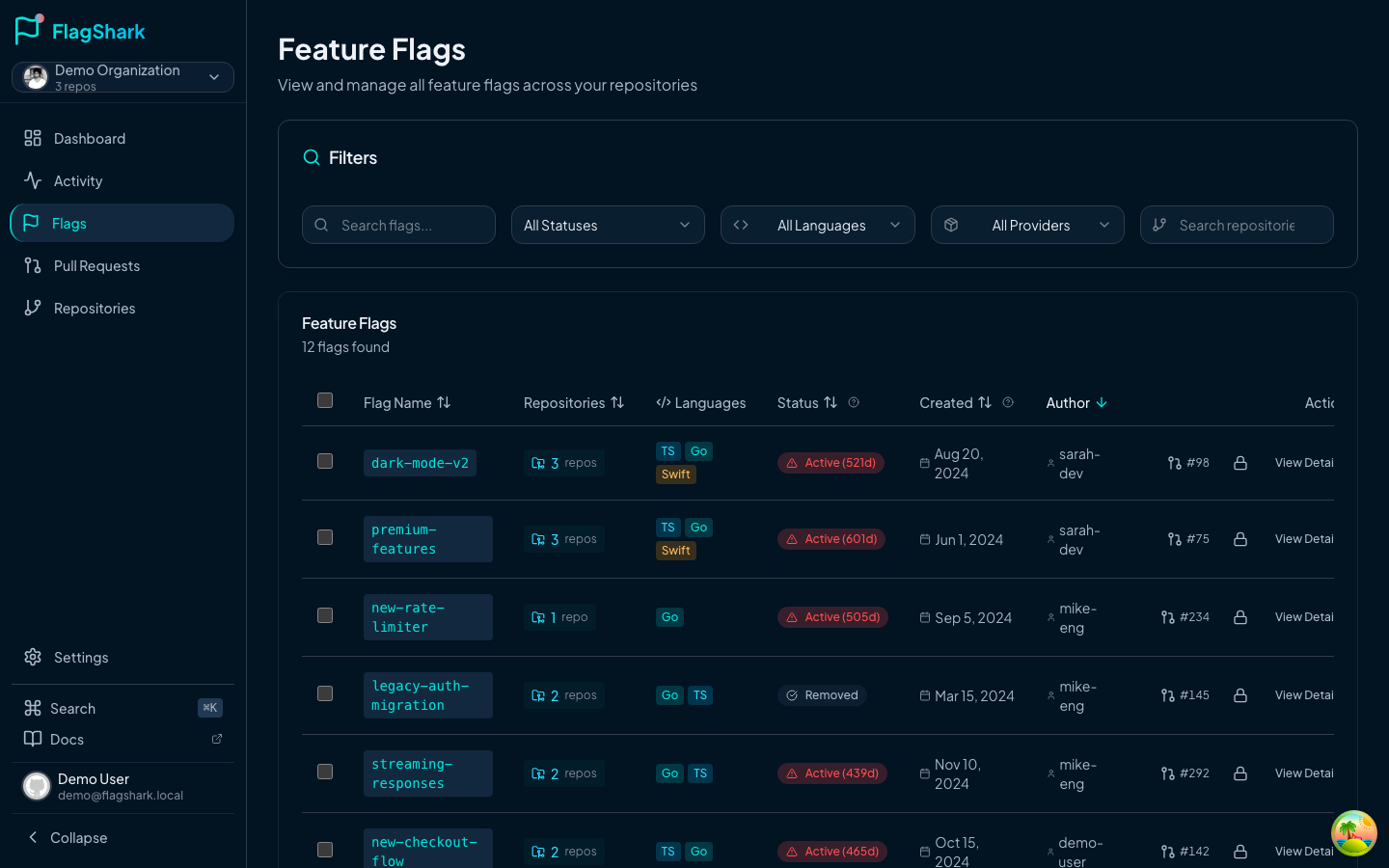
FlagShark provides views helpful for teams:
- All flags: Complete inventory
- By repository: Flags in specific repos
- Recent activity: What's changed recently
- Stale flags: Cleanup candidates
Notifications
Configure FlagShark notifications:
- New flag detected: Alert when flags are added
- Flag removed: Track cleanup progress
- Stale flag warning: Flags at 100% for too long
Reporting
Use FlagShark reports for governance:
- Flag count over time: Are we accumulating debt?
- Average age: How long do flags live?
- Cleanup rate: How fast do we remove flags?
Onboarding New Team Members
When someone joins the team:
Related Documentation
- Flag Naming - Naming conventions
- Flag Lifecycle - Complete lifecycle management
- Activity Feed - Tracking flag changes
- Configuration - Custom provider configuration