Dashboard Overview
Understand your feature flag health at a glance with FlagShark's comprehensive dashboard featuring health scores, activity trends, and actionable insights.
The FlagShark dashboard is your command center for feature flag management. It provides real-time insights into your flag health, team activity, and areas that need attention—all organized in a story-driven layout that surfaces what matters most.
Dashboard Sections
The dashboard is organized into five strategic sections, each designed to answer a specific question:
| Section | Purpose | Key Question |
|---|---|---|
| Signal | Health overview | "How healthy is my codebase?" |
| Attention | Action items | "What needs my attention?" |
| Progress | Activity trends | "What happened this week?" |
| Enablement | Deeper insights | "What patterns should I know?" |
| Growth | Upgrade prompts | "How can I get more value?" |
Health Score
The health score is the flagship metric of your dashboard—a single number (0-100) that represents your overall feature flag hygiene.
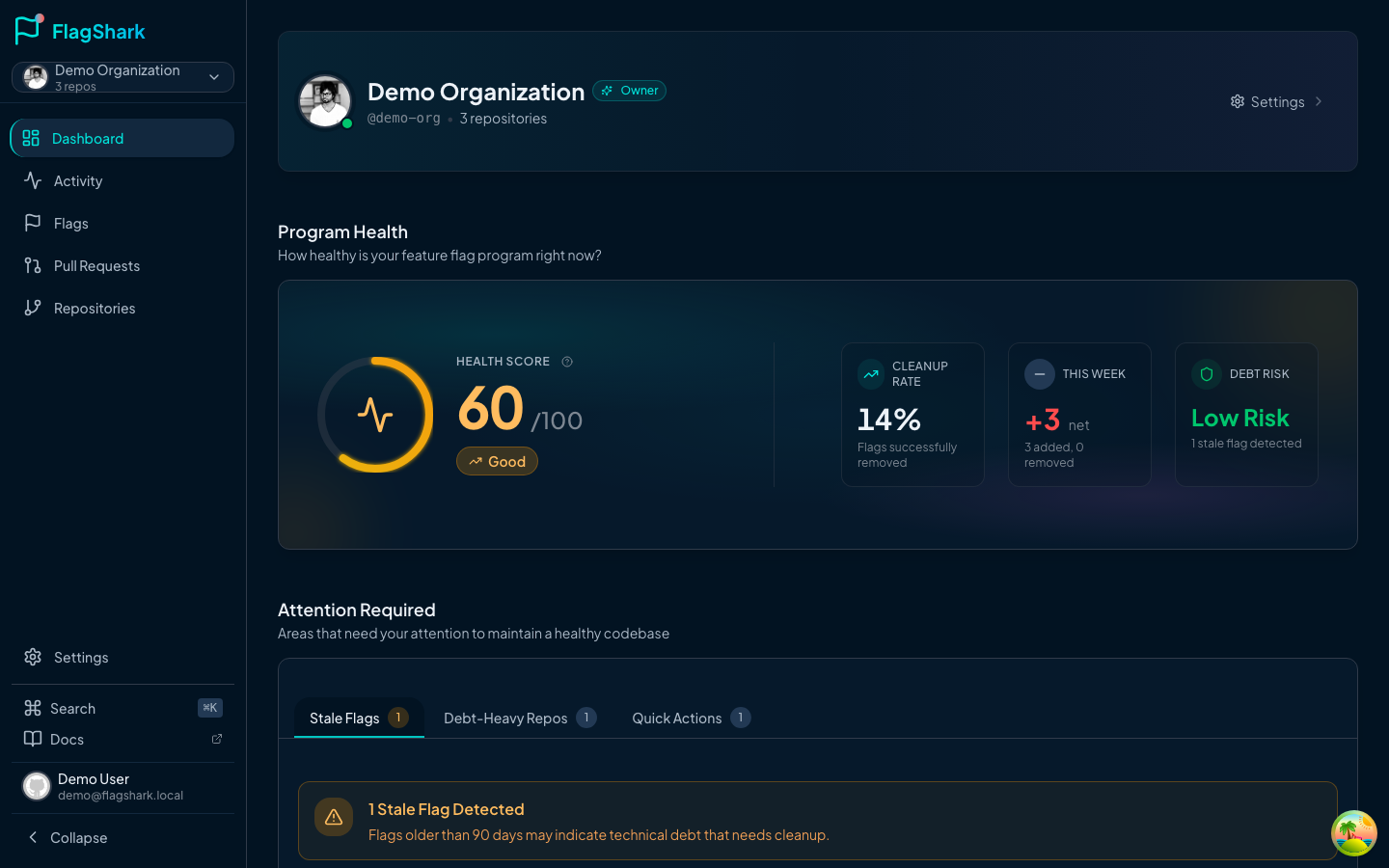
How It's Calculated
The health score combines three weighted factors:
| Factor | Weight | What It Measures |
|---|---|---|
| Stale Ratio | 40% | Percentage of flags older than 90 days |
| Age Penalty | 30% | Average flag lifespan (lower is better) |
| Cleanup Rate | 30% | Percentage of flags successfully removed |
Score Thresholds
| Score | Label | Meaning |
|---|---|---|
| 80-100 | Excellent | Great flag hygiene, keep it up! |
| 60-79 | Good | Room for improvement |
| 40-59 | Fair | Technical debt accumulating |
| 0-39 | Needs Work | Significant attention required |
Signal Section
The signal section shows your health score alongside three supporting metrics:
- Cleanup Rate — Percentage of flags that have been successfully removed
- This Week — Net flag change (added minus removed) with velocity indicator
- Debt Risk — Low/Medium/High rating based on your stale flag ratio
Attention Section
The attention section highlights items that need your action, organized into tabs:
Stale Flags Tab
Lists flags older than 90 days that should be reviewed for removal:
- Flag name and file location
- Days since creation
- Link to the original PR
- Quick action to create a removal PR
Debt-Heavy Repos Tab
Shows repositories with high concentrations of stale flags:
- Repository name and stale flag count
- Visual health bar showing the ratio
- Direct link to repository details
Quick Actions Tab
Contextual actions based on your current state:
- "Review 5 Stale Flags" — When stale flags exist
- "Connect More Repos" — When you have few tracked repositories
- "Invite Team Members" — When working solo
Progress Section
Track your team's momentum over time:
Weekly Summary
A card showing this week's activity:
- Flags added
- Flags removed
- Net change (color-coded: green for net reduction, amber for net increase)
Activity Timeline
A chronological feed of recent flag activity:
- User avatar and name
- Flag name and action (added/removed)
- PR link and relative timestamp
- Click to view full details
Activity Trend Chart
A 30-day visualization of flag additions and removals:
- Area or bar chart variants
- Trend direction indicator (improving/declining)
- Hover tooltips with daily breakdowns
Enablement Section
Deeper analytics to understand patterns in your flag usage:
Age Distribution
A horizontal bar chart showing flag ages across buckets:
| Bucket | Age Range | Ideal % |
|---|---|---|
| Fresh | 0-30 days | 60%+ |
| Aging | 30-60 days | 20% |
| Old | 60-90 days | 15% |
| Stale | 90+ days | <5% |
Language Distribution
A donut chart breaking down flags by programming language:
- Helps identify which language codebases have the most flags
- Useful for prioritizing cleanup efforts
Contributor Leaderboard
See who's been most active with feature flags:
- Top 3 contributors
- Stacked bars showing adds vs. removes
- Encourages healthy competition for flag cleanup
Command Palette
Press ⌘+K (or ⌃+K on Windows) to open the command palette—a quick way to navigate anywhere in FlagShark.
Available Commands
| Category | Commands |
|---|---|
| Navigation | Dashboard, Flags, Repositories, Activity, Settings |
| Quick Actions | View Stale Flags, View Recent Flags |
| Flags | Search through your recent flags |
| Help | Access documentation and support |
Stats Cards
Throughout the dashboard, key metrics are displayed in stat cards:
| Metric | Description |
|---|---|
| Total Flags | All detected flags with active/removed breakdown |
| Avg Lifespan | Days between flag creation and removal |
| Cleanup Rate | Percentage of flags successfully removed |
| Repositories | Number of repos containing feature flags |
Each card includes:
- Primary value with optional trend indicator
- Help tooltip explaining the metric
- Sub-value for additional context
Activity Heatmap
Found on the Activity page, the heatmap provides a GitHub-style visualization of your flag activity over time:
Understanding the Heatmap
- Darker squares = More activity that day
- Green tones = Flag removals (good!)
- Hover for daily breakdown (added/removed/total)
Embedded Insights
The heatmap includes quick insights:
- Busiest Repository — Where most activity happens
- Longest Streak — Consecutive days with activity
- Daily Average — Average activity on active days