5-Minute Quickstart
Get FlagShark detecting feature flags in your codebase in under 5 minutes.
This quickstart guide will have you detecting feature flags in under 5 minutes. By the end, you'll see FlagShark comment on a pull request with detected flags.
Prerequisites
- FlagShark GitHub App installed (Installation guide)
- At least one repository connected
- Ability to create a pull request
Step 1: Create a Test Branch
First, create a new branch in one of your connected repositories:
git checkout -b test-flagsharkStep 2: Add a Feature Flag
Add a feature flag to any file in your project. Here are examples for common providers:
LaunchDarkly (JavaScript/TypeScript)
import { LDClient } from 'launchdarkly-js-client-sdk';

const client = LDClient.initialize('your-client-id', user);

// FlagShark will detect this flag
if (client.variation('new-checkout-flow', false)) {
  showNewCheckout();
} else {
  showOldCheckout();
}
LaunchDarkly (Go)
import ld "github.com/launchdarkly/go-server-sdk/v7"

// FlagShark will detect this flag
showNewFeature, _ := ldClient.BoolVariation("new-feature-enabled", context, false)
if showNewFeature {
    enableNewFeature()
}
Unleash (JavaScript)
import { UnleashClient } from 'unleash-proxy-client';

const unleash = new UnleashClient({ /* config */ });

// FlagShark will detect this flag
if (unleash.isEnabled('beta-feature')) {
  showBetaFeature();
}
Custom Implementation
If you use a custom flag system, FlagShark can still detect it. Add a .flagshark.yaml configuration file (see Configuration).
Step 3: Commit and Push
Commit your changes and push to GitHub:
git add .
git commit -m "Add new-checkout-flow feature flag"
git push origin test-flagshark
Step 4: Open a Pull Request
Create a pull request on GitHub from your test-flagshark branch to main (or your default branch).
Step 5: See the Magic
Within a minute or two, FlagShark will analyze your PR and post a comment:
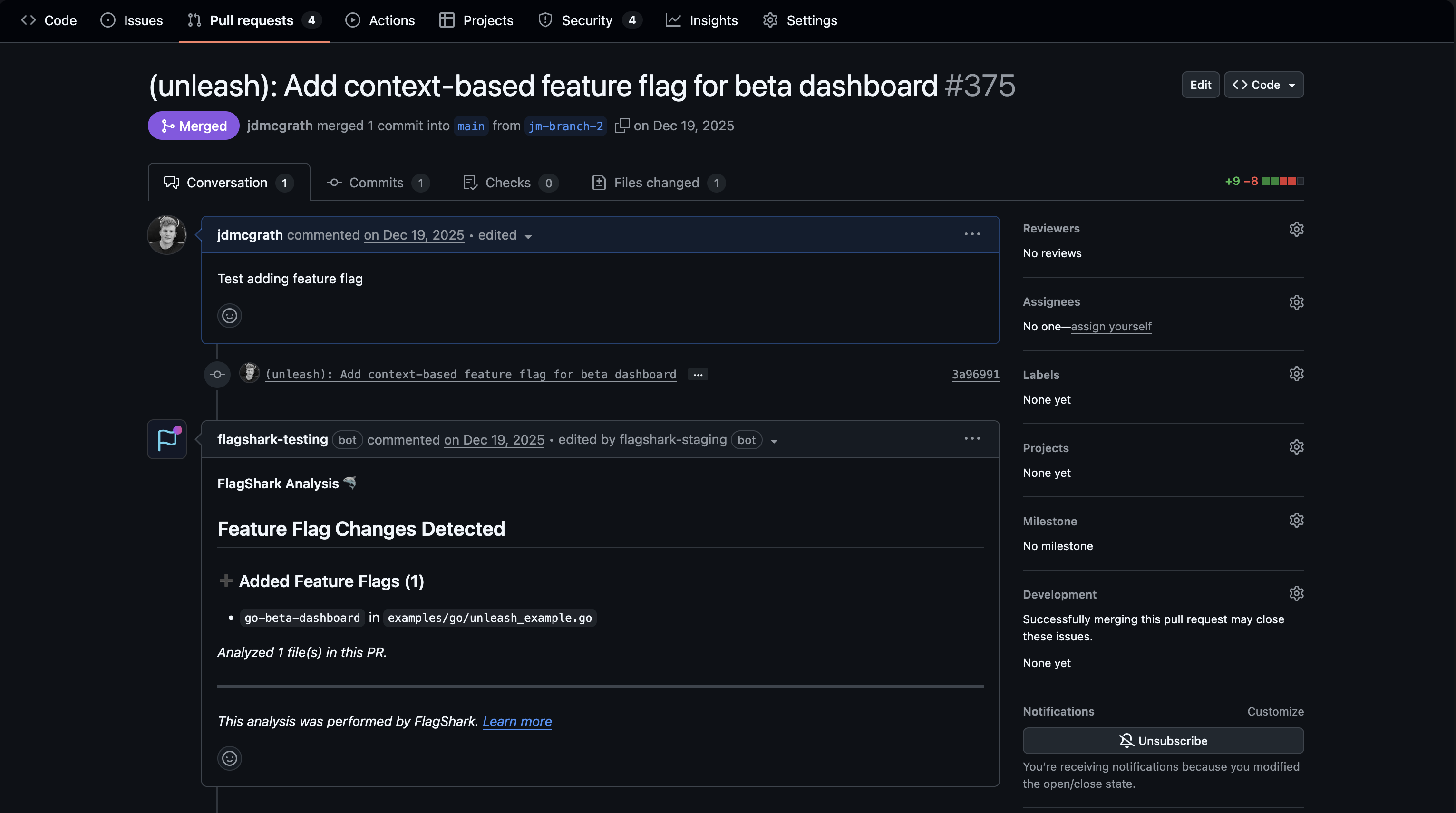
The comment includes:
- Flag name - The key/name of the detected flag
- Action - Whether the flag was added or removed
- File - Where the flag was found
- Line number - The exact location
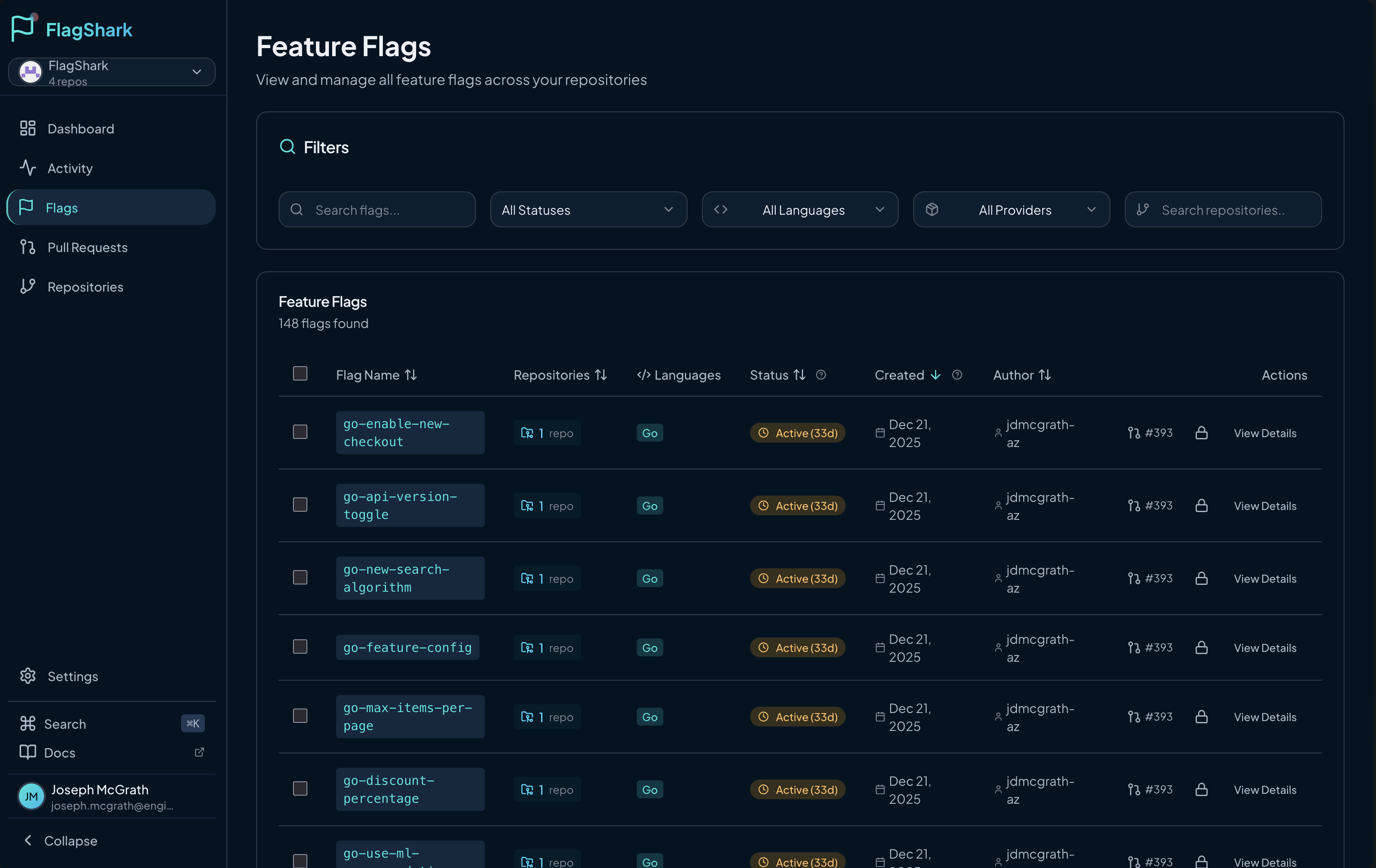
Step 6: View in Dashboard
Head to the FlagShark Dashboard to see your flag tracked:
What's Next?
Congratulations! You've successfully set up FlagShark. Here's what to explore next:
Understand the Basics
- How flag detection works - Learn about the detection engine
- Supported languages - See all supported languages and SDKs
Configure for Your Team
- Configure providers - Set up custom flag patterns
- Branch protection - Ensure all flags are tracked
Enable Automation
- Automatic cleanup PRs - Let FlagShark create removal PRs
- Activity feed - Monitor flag activity across repos
Cleanup
Don't forget to clean up your test:
git checkout main
git branch -D test-flagshark
And close the test PR on GitHub.